AI has quickly become one of the most talked-about topics in the industry. From everyday use cases like asking questions from an AI chatbot or generating images, to more advanced enterprise scenarios involving proprietary data, AI platforms, and custom models, the spectrum of possibilities is vast. However, not every business problem requires a complex AI landscape to deliver real value.
In this post, I focus on a simple and practical AI use case: enabling users to quickly fact-check and gather contextual information about customers or suppliers directly from within IFS. The goal is not to replace IFS AI or other core data verification processes, but to complement them by providing fast, user friendly search capabilities that help users make better, more informed decisions with minimal effort.
For this use case, I chose Perplexity as the AI search engine. I personally like Perplexity for several reasons, including the quality of its answers, its ability to cite sources, and—most importantly for this scenario—the simplicity and flexibility of its Search API. Compared to other options I’ve explored, it is one of the easiest APIs to work with while still delivering high-quality, reliable results.
- Use Case
- Setting up Perplexity API
- IFS Workflow Setup
- Adding the Workflow as a Command Button
- Final Result
- Summary
Use Case
Accurate Customer/Supplier information available in IFS is critical for business, and most of the customers I worked with have problems with inaccurate customer/supplier data. These inaccuracies often lead to significant setbacks, including miscommunication, delayed projects, and missed opportunities. As a result, many had to correct the information by either searching the web or consulting a business registry to validate and update the data, which can be time-consuming and inefficient.
What if we made it possible inside IFS where users can fact check and validate the information directly? By integrating a feature that allows users to dive deep into details and check various sources, we could empower them to verify if it is a trustworthy entity. This would not only enhance operational efficiency but also foster stronger relationships with suppliers and customers by ensuring transparency and reliability in data management. Also this would be a good scenario to use use public AI in a corporate world since it would not send any sensitive data.
Perplexity search API available for Pro or higher subscriptions so you’ll need one to continue.
Setting up Perplexity API
Once you have a Perplexity Pro or higher subscription, you can use the Perplexity API for search and chat completion.
Login to https://www.perplexity.ai/ and in the Account settings, select API.
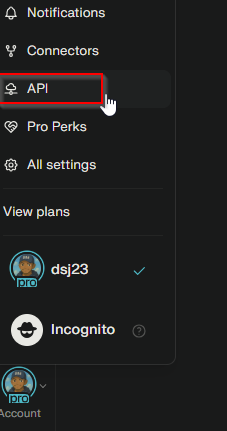
You need to setup an API group and billing before creating an API. Refer below documentation on how to setup the API keys in Perplexity.
https://docs.perplexity.ai/guides/api-key-management
Once you setup the API Group and a key, go to the API Keys and copy the key. We will need it in the IFS workflow
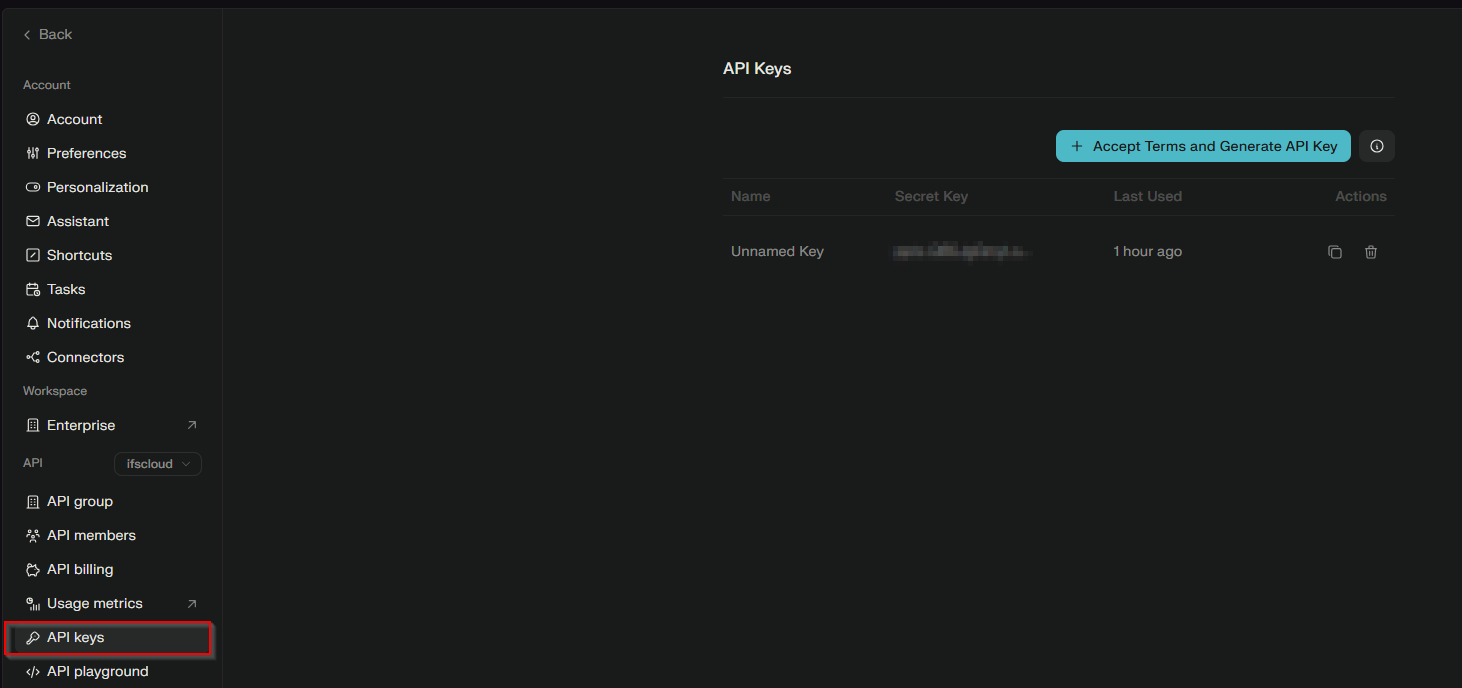
IFS Workflow Setup
I designed the IFS workflow as generic so it can be called from multiple pages in the application (Customer/Supplier). Three variables were used as the input for the perplexity search query.
Input variables:
- CompanyName: (Customer/Supplier Name)
- Country
- AssociationNo
I wanted to keep the workflow as simple as possible and work as a responsive chat agent. A User task is used to input the user query and display the AI response.
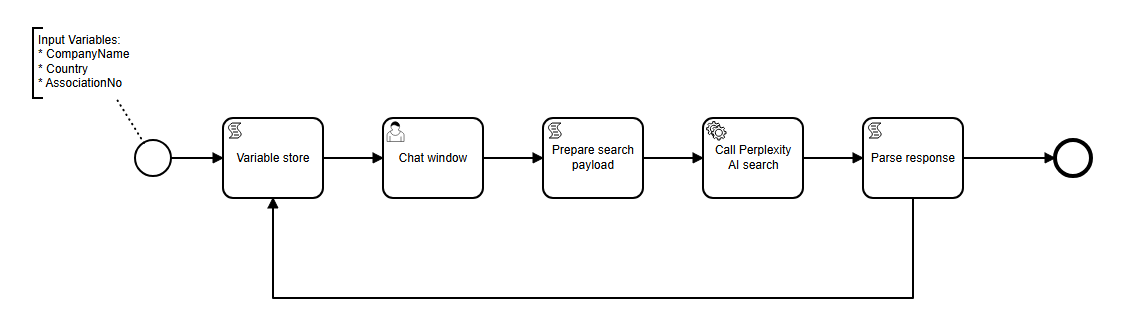
Workflow Components
Variable Store:
It’s the starting point of the workflow where the chat response is created. It can be either the initial response or the response from the AI search. Therefore the response from the Perplexity API is looped back to this.
var companyName = execution.getVariable('CompanyName');

var initConversation_ = 'Welcome! I can help you find information about ' + companyName  +' . What would you like to know?';
var reply_ = execution.getVariable('AiResponse');

if (!reply_ || reply_.trim() === '') {
  execution.setVariable('varReply', initConversation_);
}
else {
  execution.setVariable('varReply', reply_  + '\nCan I help you with any other information about the company?');
  execution.setVariable('FormField_Question', '');
}
Chat:
Next step of the workflow is the user chat. A simple User task with two attributes were used for the user input and the chat response.
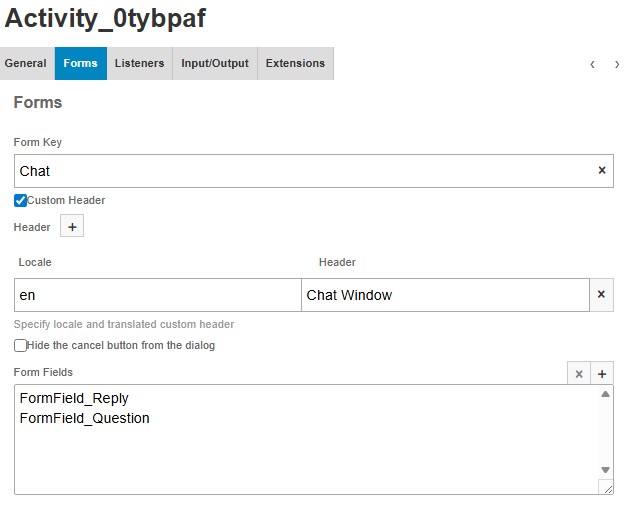
Reply is the varReply variable from above, and the Question is a free text field where user can type the query.
Prepare the Perplexity payload
JSON payload for the Perplexity search API is generated using the context variables (Company information) and the user query.
Perplexity Chat Completion API is used in this example. It has a simple json input of the user query and sends the AI response. I have added a system role also to give some instructions to the model to give more appropriate response.
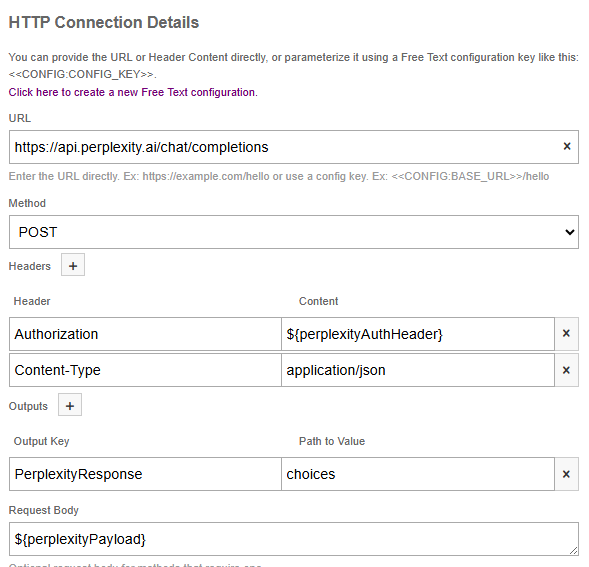
I have created the Auth Header inside the script by using the perplexity API key created above. This can be also configured in a REST Task configuration (after 24R2) which give more flexibility with parameter management
API docs for Perplexity chat completion can be found here. https://docs.perplexity.ai/api-reference/chat-completions-post
var question_ = execution.getVariable('FormField_Question') ;

var companyName_ = execution.getVariable('CompanyName');
var country_ = execution.getVariable('Country');
var associationNo_ = execution.getVariable('AssociationNo');

var userQuery = question_  + ' Company name: ' +  companyName_ +
                            ", Country: " + country_ +
                            ", Association Number: " + associationNo_ ;

var payload = {
  "model": "sonar",
  "messages": [
    {
      "role": "system",
      "content": "You are a friendly company information assistant. Rules: (1) Keep answers short and relatable - 1-2 sentences max. (2) Do not add references or citations. (3) Return only the best match. (4) Use newlines for formatting the results. (5) Simple, conversational language."
    },
    {
      "role": "user",
      "content": userQuery
    }
  ]
};

// Convert to JSON string for the HTTP call
var payloadJson = JSON.stringify(payload);
execution.setVariable('perplexityPayload', payloadJson);

// hard coded API key so it can be used in all IFS Cloud versions.
// You may use REST task configurations to store API keys in 24R2 or later IFS versions
execution.setVariable('perplexityAuthHeader', 'Bearer ' + 'pplx-YOUR_PERPLEXITY_KEY');
Call Perplexity API
Next step of the workflow is to call the perplexity API with the query and get the response. IFS REST call task was used for this and the choices node in the response was stored as a output variable.
Parse Response
Once the response is received, we need to parse the content and add to the a context variable to be shown to the user.
var responseObj = JSON.parse(PerplexityResponse);
var responseContent = responseObj[0].message.content;
execution.setVariable('AiResponse', responseContent );
These are the basic steps needed to complete our workflow. Publish the workflow so that we can then add as a custom command trigger.
Adding the Workflow as a Command Button
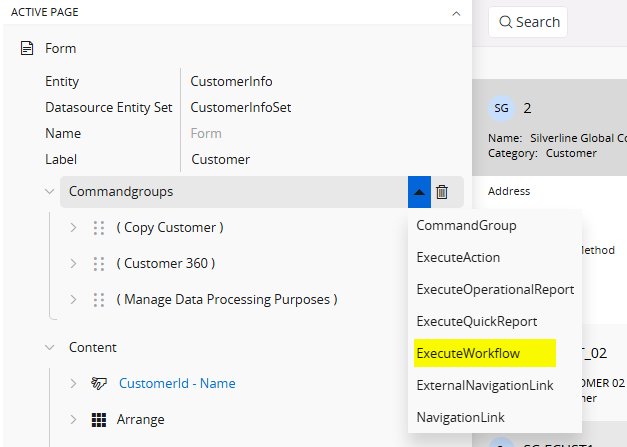
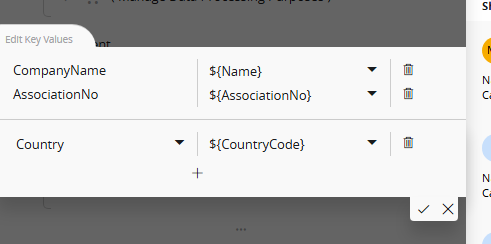
Workflow variables are bounded to the values in the current record
Final Result
Now our workflow is ready to use! A user can provide their own search query and find more information about the customer or supplier.
Summary
This blog post discusses how to use AI in IFS with simple configurations. By adopting AI technologies, organizations can improve their processes and make better decisions. I hope this inspires new ideas for integrating AI into workflows. Through practical applications and examples, this post shows how AI can be accessible and transformative, leading to greater efficiency and effectiveness in different areas of operation.
Complete workflow used in this post can be downloaded from my GitHub:
https://github.com/damithsj/dsj23/blob/master/C_Perplexity_Company_Verification_version_2.bpmn
Hope you liked the post and found it helpful! Feel free to drop your thoughts and any cool ideas you’ve got about mixing AI with IFS Cloud ❤️
 DSJ's Blog
Really neat. Nice work.