There are several ways of triggering a workflow. Projection Action, Event Action are the most common triggering options and with 23R1, IFS has added a new feature to call a workflow from a custom command from page configuration. Did you know that this opened a new possibility of starting a workflow using a REST API call?
Sound exciting? read through to find the simple steps you need to follow to make it work!
Workflow REST API Engine
As you might already know, IFS workflows runs with Camunda platform which has a built in REST API. As far as I checked, same rules related to Camunda REST API applies when calling an IFS Cloud workflow as a REST API as well.
Some important endpoint of the workflow REST engine I could find so far as follows. I’ll update the list if I come across any new endpoints. Please leave a comment if you know more interesting things about this!
- List the workflow definitions
GET {{ifs_url}}/main/ifsapplications/projection/engine-rest/process-definition
- Start Workflow
POST {{ifs_url}}/main/ifsapplications/projection/engine-rest/process-definition/key/{key}/start
Calling the Workflow using a REST API
Authentication
First thing you need to do is to authenticate with IFS cloud and obtain an access token. In this demo, I’m using a access token obtained through client credentials flow using a service user, but you can authenticate as an end user as well. If you need more help with IFS Cloud authentication, please read my previous blog Authentication in IFS Cloud for detail description on how to setup authentication for calling IFS Cloud APIs.
Payload Format
Payload for the workflow REST engine is JSON and in a sample payload is given below. Attribute names can be of your choice and the values can be used inside the workflow execution.
{
    "withVariablesInReturn" : true,
    "variables": {
        "Variable1": {
            "value": "10",
            "type": "String"
        },
        "Variable2": {
            "value": "test",
            "type": "String"
        },
        "VariableN": {
            "value": "test",
            "type": "String"
        }
    }
}
Update 2025-04-08
By setting attribute “withVariablesInReturn” : true, the variables set in the workflow are returned in the response. Huge thank to Stephan Lück for bringing the question in the comments and I was never even thinking about it until that.
More details on payload for start workflow using rest api can be found in the Camunda docs. https://docs.camunda.org/rest/camunda-bpm-platform/7.23-SNAPSHOT/#tag/Process-Definition/operation/startProcessInstanceByKey
HTTP Request
Given below is a sample HTTP request to execute a workflow, where TEST_WF is my workflow process key.
POST /main/ifsapplications/projection/engine-rest/process-definition/key/TEST_WF/start HTTP/1.1
Host: xxx.ifs.cloud
Content-Type: application/json
Authorization: Bearer [ACCESS_TOKEN]
Content-Length: 220

{
    "variables": {
        "PersonId": {
            "value": "NORA",
            "type": "String"
        },
        "Title": {
            "value": "Test123",
            "type": "String"
        }
    }
}
Example Workflow
As a demonstration, I’m using the workflow input to search a Person record and update the title. Workflow design is simple as below.

Now we’ll look into each step of the Workflow
Process Variables
It’s a script task to fetch the attribute values from the payload and assign to process variables.

To match this, our payload should be in below format.
{
    "variables": {
        "PersonId": {
            "value": "NORA",
            "type": "String"
        },
        "Title": {
            "value": "Test123",
            "type": "String"
        }
    }
}
Get Person Record
Here we can use the PersonId coming from the incoming JSON to get the Person record.

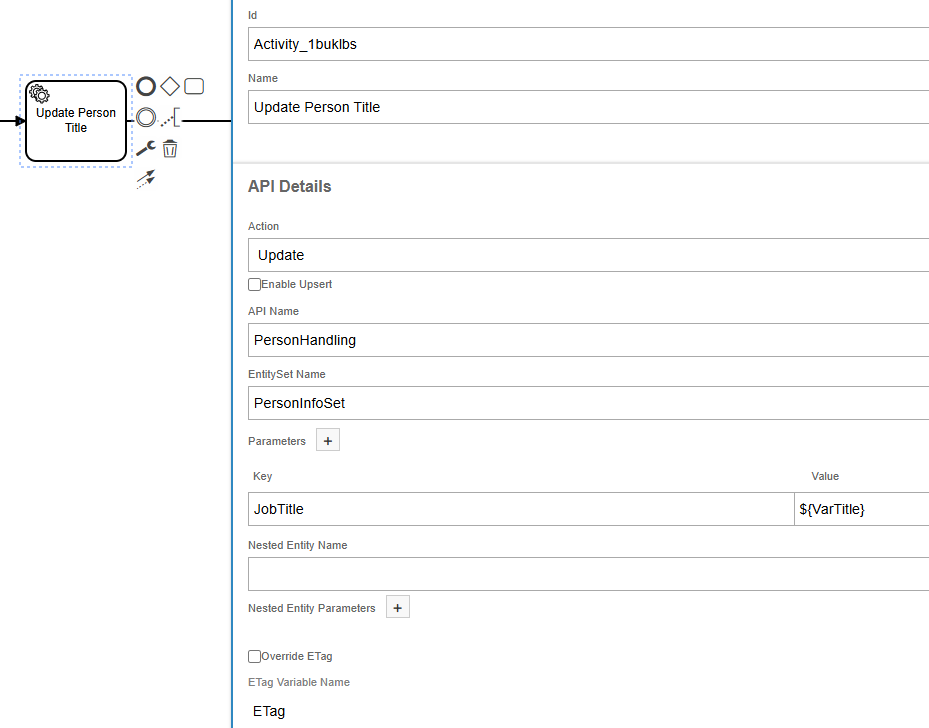
Update Person Record
Finally, we can update the retrieved Person record with the new title value from the payload
Postman request/response for this request looks like below

Potential and Applicable Area
I personally think this is a great feature even though no documentation regarding this can be found until 24R1 IFS documentation and there are many potential applications.
Using this method, we can reuse a workflow created to execute from a custom command to invoke externally and get the work done. It can also be used to simplify integrations where several API requests and validations need to complete a flow. We can define the logic in a workflow and send it as a single request.
Idea to try this was sparked by a Camunda blog post Start and Step Through a Process with REST which explains the steps to invoke a workflow which includes a user task. I haven’t try that yet with IFS but it could be a big achievement if this can be done. If someone willing to give a try, please leave a comment!
Hope you pick up some cool stuff about IFS today! Don’t forget to share and drop your thoughts below. ❤️
 DSJ's Blog
Hey, I found your page and I’m excited, this is it what I was looking for
Best regards!
Glad that it helped. Good luck with your developments 🙂
Great article, thank you very much!
My colleagues and I are currently puzzling if it is possible to add data to the HTTP response, e.g. LU and KEY_REF of data created by the workflow.
Not sure if this is possible or makes sense at all.
Thanks in advance for your feedback,
Stephan
Hi Stephan,
Try to add the withVariablesInReturn = true in the request. According to the Camunda doc, it could be what you are looking for 🙂
https://docs.camunda.org/rest/camunda-bpm-platform/7.23-SNAPSHOT/#tag/Process-Definition/operation/startProcessInstanceByKey
I haven’t tried that myself but would be awesome if it could get to work!
Let me know if it works for you so I’ll add to the blog as well.
Cheers!
Damith
It’s actually possible to return the variables using withVariablesInReturn = true in the request. Blog is updated with the details!
Thank you for your response, Damith!
I’ll try this as soon as possible.
Cheers,
Stephan
Hi Damith, great!
This is exactly what we need! Thank you so much!
See you,
Stephan
Thanks Stephan, Glad to hear it helped!
Note that the response can get pretty complex. It will contain all read values. And also the ones you set, e.g. by Inline Script like
execution.setVariable(‘MyFreakingValue’, 666);
Damith,
This is awesome and exactly what I need. I’m able to run the workflow through a REST call, but using the “withVariablesInReturn”:true value in the body is not returning the process variables that I can see are set in the workflow. I’m doing this with a very basic test workflow that just returns an object with 4 properties, so I don’t know what might be wrong. I also tried just returning a string, but still nothing. Do you know what it could be?
Dylan
Do you think that you could use this in a workflow to call another workflow?
Hi David,
This post actually is a by-product of what you are asking 🙂
I put the following question on IFS Community and got to know about the workflow endpoint; actually it’s the same which calls with a workflow type command.
https://community.ifs.com/framework-experience-infrastructure-cloud-integration-dev-tools-50/is-it-possible-to-execute-a-different-workflow-inside-a-workflow-51253
To answer your question, Yes, it’s possible to call another workflow within a workflow using this method, but the call goes as a REST call.
It has several downsides as I see
* Call to the other workflow goes in a different transaction than first workflow
* since the call goes as a generic REST call, it need to authenticate first, and could only be run as a service user, not the same user executing the work.
* Call to the second workflow routes through internet so the performance should be poor compared to an internal call
Therefore I don’t recommend as a feasible approach to call a workflow from a workflow.
A better approach is to create a dummy projection action and then in the first workflow, use a projection action to the dummy action, and in the 2nd workflow, use the same action as a trigger.
I have mentioned some more details on the above IFS Community post 🙂
Cheers!
Damith