In this post, I want to share my experience with another cool feature of IFS Cloud workflows, to make a REST call to an external API during a business transaction and read the response. Similar capability is there in the Event actions as well, but workflows bring new capabilities which are limited using event actions such as,
A workflow can read the API response and use it to modify business transaction
User can be notified with the API response or failures
In this article, we’ll see how to build a IFS Cloud workflow to send data to an external API and give a popup notification to the user with the API response.
Below is my simple mock server which accepts a POST request and sends a response.
Response is a static json with following format
{
	"apiResponse": "Record successfully created!"
}
Postman Mock Server
Copy the mock server URL which we’ll be using in the next steps when designing the workflow.
Business Scenario
We’ll use a simple business case to tryout the REST call capabilities of a workflow. Every time a Customer record is created or modified in IFS Cloud, we need to send the data to an external API, get the response and show a popup to the user with the response from the API.
Creating the BPMN flow
We’ll move on to create the workflow. for additional guidance on creating a workflow, please refer my previous blog post which explains more details on step by step guide to build a workflow. To create a new workflow,
Navigate to the Workflow page, and create a new workflow. Give a Process key and create.
Our workflow contains 3 simple steps.
Retrieve the data using the keys included in the workflow input
Call the REST API
Display Message to the user
BPMN flow
Get Customer Data
To retrieve the data, we can use IFS Projection call type task. We can call the Same Projection and the entity set to get the data.
You could immediately recognize one big advantage with workflows. If we are to get the data from the same entity while insert/update using an event action, it ends up with a table mutate error and would require other means to get the required data.
Call the REST API
To send the data to an external REST API, we can use IFS REST Call type task. We can create the payload to send to the mock server API using the values returned by the previous Projection call. In this example, I’m creating a simple payload with customerId and Name.
We can process the response from the API and use it in the next steps of our workflow. Our API sends a Json with attribute named apiResponse and I have added it to the _apiResponse key.
User Message
We can use the User Task task type to give a message to the user. I wish we could create a toast message since it’s only information to the user, but seems it’s not possible with workflows (yet). Please comment if you found a way to do this!
I have used the _apiResponse which we saved earlier as a form field so we can display the response from the API to the user.
After this, add an End event to finish the workflow execution.
Save and Deploy the latest version of your workflow.
Projection Action
Last step is to create the projection action to trigger the workflow.
In the workflow, Press + in the Projection Action Information and add the CustomerHandling as the Projection.
In the next step, choose Action Type as DATA and Entity Set Name as CustomerInfoSet
Since we need to send the data with each insert and update, check the actions.
Choose the Execution type as User Interaction and set Timing to After.
Enable the Projection action in the next step and Finish.
Workflow in Action!
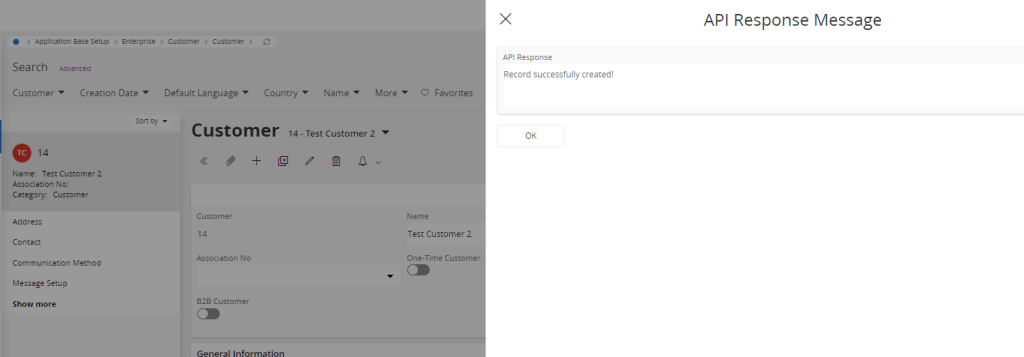
Go to Customer page and create new/modify existing record. You should get a popup dialog with the response from the API!
API Response
Check the Postman Mock Server to verify if the payload received from IFS
Conclusion
Using IFS workflows, we could use extend from the outside capabilities to connect to other systems and build real-time integrations. This is a very useful feature which can be applicable in many business scenarios.
However, the IFS REST Call does nto provide advanced features like authentication, processing response headers and I found request, response json/xml handling is somewhat difficult and you need advanced scripting knowledge to create a complex payload or to process responses.
There’s no inbuilt logging feature for REST API calls and it’s hard to keep track of the API calls and the responses. I’m surprised by realizing that workflows are not using the IFS Connect to make the REST calls. It would be nice if it has been integrated with the IFS Connect similar to Event actions so it can utilize the IFS Connect capabilities as well.
My bottom line is, if you need to build a simple, real-time integration with another system, workflow if a great tool to use. If the integration requires great deal of processing and need to have a good visibility of the messages passed between the systems, better to do it as a customization involving IFS Connect.
Code
This file contains hidden or bidirectional Unicode text that may be interpreted or compiled differently than what appears below. To review, open the file in an editor that reveals hidden Unicode characters.
Learn more about bidirectional Unicode characters
As I aware workflow trigger using projection action was added in 22R1 or 22R2. Unfortunately it’s not available in 21RX. I believe you could do the same using event action as well. Then the trigger can be configured for CustomerInfo Entity and hope you can do the same workflow.



 DSJ's Blog
Very Usefull,
Having some problemes connecting to the url
Any idea please?
Hi NG,
It could be that the API allows connections from trusted IPs.
Can you check with the API vendor if they have any such restrictions?
Very Useful.
I’m currently blocked when contacting the URL.
Any idea please?
Thanks for a basic example! A much better explanation than anything in Academy.
Thanks Marco 🙂
Projection Delegate : https://d.pr/i/pMHktV
Http Connection Delegate : https://d.pr/i/gQd7CC
Event Action Detail :https://d.pr/i/ZY1M20
Workflow : https://d.pr/i/z5Qs6E
Hi Mukesh,
Try to use the workflow debugger and see which point your flow is failing.
https://docs.ifs.com/techdocs/23r2/040_tailoring/500_business_process_automation/040_workflow_tooling/#start_watching
Okay gotcha.
Do you have any article on Workflow calling external rest API ?
And this is your given bpnm file which i uploaded it also not showing Project Action Configuration :
https://d.pr/i/jh4AyY
According to your screenshot of Projection Action Configuration setting, it is not available in my side. Check this screencast : Video
Hi Mukesh,
Which IFS Cloud version are you in?
i am in 22R2
Could not figure out which Cloud Version it is but i found below information :
IFS Aurena framework version: 21.2.16.20230104083914.0
IFS Aurena client version: 21.2.16.20230104083914.0
IFS OData provider version: 21.2.16.20230104105134.0
Current Version is 21R2
IFS Aurena framework version: 21.2.16.20230104083914.0
IFS Aurena client version: 21.2.16.20230104083914.0
IFS OData provider version: 21.2.16.20230104105134.0
Hi Mukesh,
As I aware workflow trigger using projection action was added in 22R1 or 22R2. Unfortunately it’s not available in 21RX. I believe you could do the same using event action as well. Then the trigger can be configured for CustomerInfo Entity and hope you can do the same workflow.