Include additional attachments in IFS e-mail report is one of the top posts in my blog and received many good comments. One of the questions was that the methods used here are not compatible in IFS Cloud.
Script used in above post was developed for Apps8. By that time, Command_SYS.mail has limited capability of handling attachments. It could handle only files stored in extended server and add them as file path, and add the report pdf file.
Form IFS Application 10 onwards, Command_SYS mail functionality has several improvements. One major improvement is the way it handle attachments in emails. Now, it is possible to add attachments as an array of CLOBs or BLOBs or a file path (applied only for on-prem IFS cloud installations).
Below are the overrides of COMMAND_SYS.Add_Attachment for attaching documents stored in different data formats
PROCEDURE Add_Attachment (attachments_ IN OUT NOCOPY attachment_arr, filename_ IN VARCHAR2, attachment_ IN CLOB );

PROCEDURE Add_Attachment (attachments_ IN OUT NOCOPY attachment_arr, filename_ IN VARCHAR2, attachment_ IN BLOB );

PROCEDURE Add_Attachment (attachments_ IN OUT NOCOPY attachment_arr,  filepath_ IN VARCHAR2,  i_  IN NUMBER );
In this post, we will look into two common scenarios of including additional attachments in IFS emails.
Create a CSV and attach as a file in IFS email
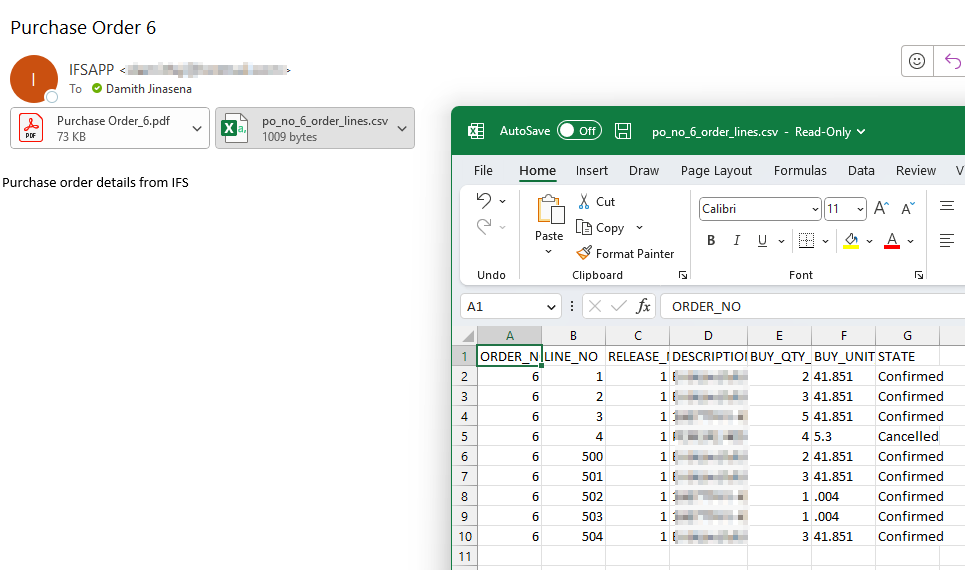
Suppose it’s needed to create a CSV file with order details and attach with the Purchase Order email once it’s printed. We can create the CSV inside our event script and attach as a CLOB in the email. Below script shows the approach in detail.
Here’s the resultant email and the content of the CSV looks like
Send Email including Documents and media attached to the record
In this example, we are attaching the documents and media attached to the Work Order when printing the Work Order report.
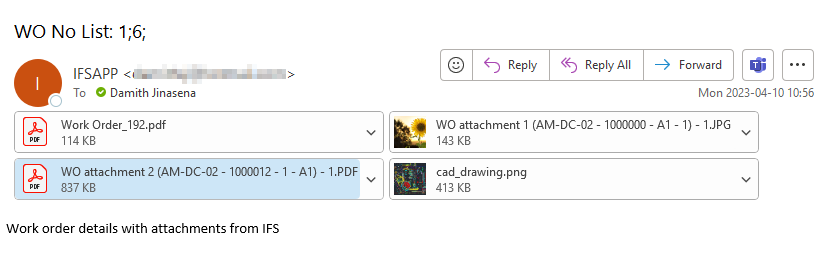
I hope this would give a better idea on dealing with attachments in IFS report emails. You can mix and match the scripts and create emails with the information you need. Please share your thoughts or if you find any cool tricks with handling attachments below 😎
 DSJ's Blog
Hi Damith,
This is great! I was able to process it from the back end. But for some reason when I run it through an IFS Event, it doesn’t attach the documents.
My development consists of two parts.
My logic as below.
This worked when I processed for the document attachments on the purchase order line. But for some reason I cannot pull them from the part revision. Even though I transferred them from part revision to Purchase order, the original file is stored in part revision.
DECLARE
keyref_ VARCHAR2(4000);
–curosr to get the document blob file from part revision
CURSOR get_attachments IS
SELECT a.doc_class,
a.doc_no,
a.doc_sheet,
a.doc_rev,
e.doc_type,
e.file_no,
e.file_name
FROM IFSAPP.Doc_Reference_Object a
left join ifsapp.Edm_File e
on e.doc_no = a.doc_no
and e.doc_class = a.doc_class
left join ifsapp.PURCHASE_ORDER_LINE_PART po
on po.ORDER_NO = ‘59140’
where a.lu_name = ‘PartRevision’
and po.PART_NO =
ifsapp.client_sys.Get_Key_Reference_Value(a.key_ref, ‘PART_NO’);
attachments_ IFSAPP.COMMAND_SYS.ATTACHMENT_ARR;
attachment_ BLOB;
text_ CLOB;
text varchar2(20000);
BEGIN
— Open to cursor and loop to get all the document records
FOR rec_ IN get_attachments LOOP
text_ := ‘Mail body’;
dbms_output.put_line(rec_.file_name); ifsapp.Edm_File_Op_Announce_API.Announce_File_Operation(rec_.doc_class, rec_.doc_no, rec_.doc_sheet, rec_.doc_rev, 'READ'); --get file object from edm_file_storage dbms_output.put_line(rec_.file_name); attachments_(rec_.file_name).blob_ := ifsapp.edm_file_storage_api.Get_File_Data(rec_.doc_class, rec_.doc_no, rec_.doc_sheet, rec_.doc_rev, rec_.doc_type, rec_.file_no);END LOOP;
–Attach doduments to the mail and finally include the report PDF file and send mail
–Add the report PDF as an attachment
ifsapp.COMMAND_SYS.Add_Attachment(attachments_ => attachments_,
filepath_ => ‘&PDF_FILE’,
i_ => 1);
ifsapp.COMMAND_SYS.Mail(sender_ => ‘IFSAPP’,
from_ => ‘ifs.sandbox.mail@abdynamics.com’,
to_list_ => ‘&USER_MAIL_ADDRESS’,
cc_list_ => ‘nadeesha.liyanage@abdynamics.com’,
bcc_list_ => null,
subject_ => ‘&PDF_FILE_NAME – Your PDF for this Purchase Order is attached with all the attachments’,
text_ => ‘Please find attached your Purchase Order &PDF_PARAMETER_6
Any problems,
please contact purchasing.’,
attachments_ => attachments_,
mail_sender_ => ‘MAIL_SENDER1’);
END;
Any help would be appreciated.
Regards
Nadeesha
Hi Nadeesha,
I directly can’t see any obvious problems in your code. Can you check if your cursor get_attachments return values in the event when running as end user?
One possible cause is that the user doesn’t have view access to the document.
You were right!
This required giving Admin privileges to FNDCONNECT.
Thank you 🙂
Hi Damith & Nadeesha,
I have tried both your code and Nadeesha’s (I too am trying to return documents from another LU – PurchasePart in my case).
I have tried granting a permission set containing Admin System Privilege to the end user and IFSConnect (I cant edit the FNDCONNECT permission set) but still only receive the email with the standard PDF report and not the additional PDF against the Line/Purchase Part.
Any help would be greatly appreciated.
Thanks
Hi Jake,
Where are your documents are stored? Is it in the database or in Azure file storage? This method works only if the documents are stored in the database.
Hi Damith,
Thanks for the reply. I have managed to sort it now. I used PURCHASE_ORDER_LINES_TAB instead of the view and it seems IFSCONNECT was fine to use that without any additional permissions.
Cheers, Jake
Hi Jake,
Glad that you were able to solve that. What you might have missing was the company/site access to IFSCONNECT user since Purchase order view relies on the site level access 🙂
Hi Damith,
With this method, do you see any possibility to auto convert the .csv file into a .bin file and attached that .bin file into the email, when the file content is too large?
Regards,
Dulmini.
Hi Dulmini,
I think you should be able to do that if you can convert the file to the correct binary format you want.
This github repo contains some nice plsql utils to convert file to different binary format such as .zip. Hope it will help
https://github.com/mortenbra/alexandria-plsql-utils
Hi Damith,
Thank you. I’ll refer to the github repo.
Best Regards,
Dulmini.
Hi Damith,
Please can you send the PRD_REPORT_CREATED event action configuration which you used/
Thank you
Hi Madusha,
I’m not sure what you meant here. Can you please explain a bit more? 🙂
/Damith
Hi Damith,
Thank you this is very Helpful indeed.
I have a question releated to COMMAND_SYS.Mail, do you know if one could add this to a custom projection and then use it in a workflow in IFS Cloud? It seems getting information via projection calls is a lot easier than using the plsql functions/procedures
Thanks,
Bryan
Hi Bryan,
It’s possible to add COMMAND_SYS.Mail as a custom action in a projection. I’ll try to get the same setup working using a workflow and let you know 🙂
Regards,
Damith
Hi Damith,
It is very helpful. Thank you.
Thanks Hasan😎